Customer Onboarding Automation: What to Automate and What Not To

Key Takeaways
- Onboarding automation works best when it handles the operational skeleton (task assignments, reminders, document collection, status updates) while keeping humans present at the moments that determine whether a client relationship actually takes hold.
- The most common mistake teams make is not automating too much. It's automating the wrong things: the kickoff call, the first escalation, the moment a client goes quiet.
- A good automation framework starts with mapping your process before touching any tool. The teams that skip this step end up with faster versions of a broken process.
Most teams automate onboarding to save time. The ones that do it well automate to protect their CSMs' attention for the moments that actually determine renewal.
One CS lead put the coordination problem plainly: "There's a lot of back and forth, with emails, making appointments, checking in... there are so many variables." The goal wasn't to remove people from the process. It was to take the admin off their plate so they could focus on the parts that actually matter.
That's the right framing. But it's only half the picture.
Some parts of onboarding are fragile. A kickoff call done well builds trust that takes months to replicate otherwise. A client who goes quiet and hears nothing back from a human, only automated nudges, is already halfway out the door.
This guide covers how to separate the two. What to automate, what to protect, and how to build a workflow that scales without becoming the kind of onboarding experience that contributes to the 90% of customers who say companies could do better, according to Wyzowl's research.
What Is Onboarding Automation?
What is onboarding automation?
Onboarding automation is the use of software to handle repeatable tasks in the customer onboarding process. Things like sending welcome emails, assigning tasks, triggering reminders, collecting documents, and updating CRM records, all without manual input for each customer. It frees CS teams to focus on relationship-building and problem-solving rather than administrative coordination.
Automation handles process. It does not handle relationships.
The distinction sounds obvious. In practice, it gets blurry fast, especially when teams are stretched thin and the temptation is to push more into automated sequences.
Why automate onboarding in the first place?
Because manual onboarding doesn't scale, and it's inconsistent by default.
When onboarding is fully manual, the quality of the experience depends entirely on who handles it and how much bandwidth they have that week. Two customers in the same tier can have completely different experiences just based on timing.
Automation fixes that. It creates a floor, a consistent baseline every customer gets, and frees up your team's time for the conversations that actually require a human.
The challenges of manual onboarding
Before getting into what to automate, it's worth being specific about what manual onboarding actually costs.
Inconsistent customer experience. Without a standardised process, the quality of onboarding depends entirely on which CSM handles it and what their week looks like. Some customers get thorough walkthroughs. Others are left to figure things out alone.
Slow time-to-value. Manual processes make customers move at the pace of your team rather than their own. Scheduling kickoff calls, sending follow-ups, answering the same questions repeatedly; each of these creates a small delay, and the delays compound. The client who should have seen value in week two is still waiting in week five.
Heavy workload for CS teams. Onboarding requires a lot of touchpoints. Without automation, CSMs spend a significant portion of their time on coordination: chasing tasks, sending reminders, manually updating records. That's time not spent on the conversations that actually influence retention.
No visibility into where clients are stuck. When onboarding is managed across emails and spreadsheets, there's no reliable way to see which clients are progressing and which are falling behind. Teams end up reactive, stepping in only after a client has already disengaged.
Automation addresses all four, giving the human element room to operate where it actually matters.
The rest of this guide covers exactly how to do that: which tasks to hand to automation, which moments to protect, and how to build a process that holds up at scale.
What Parts of Onboarding Should Be Automated?
What parts of onboarding should be automated?
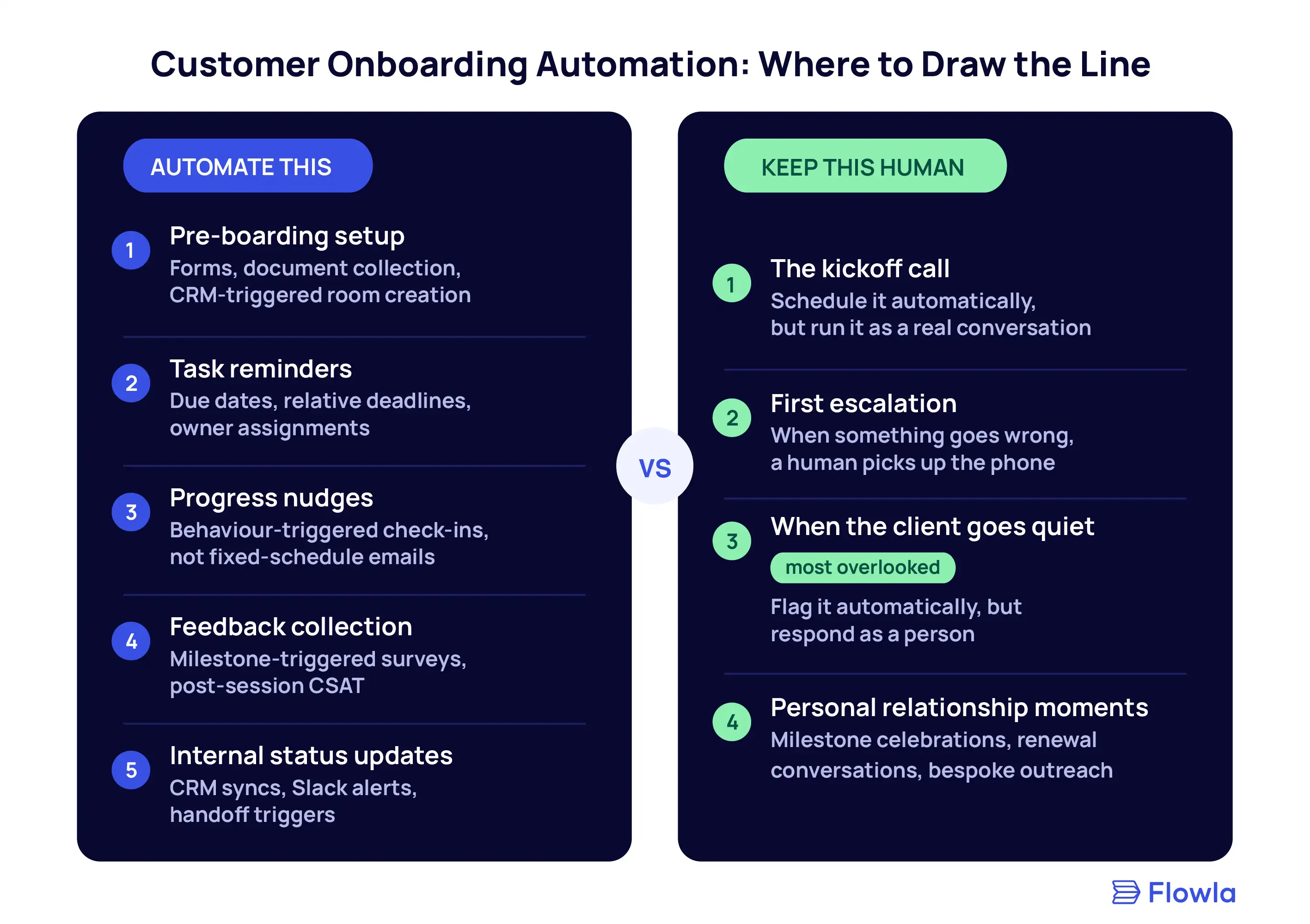
The parts of onboarding that should be automated are repeatable, time-sensitive, and low-stakes relationally. Things like pre-boarding setup, task reminders, document collection, progress nudges, and internal status updates. These are the steps where manual handling adds no value and creates bottleneck.
Here's what that looks like in practice:
1. Pre-boarding setup and information collection
Before the kickoff call even happens, there's a pile of admin: getting the right contacts added to the account, collecting technical requirements, gathering data your team needs to run the onboarding properly. All of this can be automated.
- Send the onboarding room or portal as soon as the deal closes.
- Use forms to collect what you need.
- Set up the CRM trigger so the room gets created automatically when a deal stage changes.
By the time you're on the kickoff call, the client has already done the groundwork, and you're not starting from zero.
According to OnRamp's 2026 State of Onboarding Report, 62% of CS leaders said they lack real-time visibility into onboarding progress. A lot of that visibility problem starts here, at the pre-boarding stage, where information lives in email threads instead of a structured system.
2. Task assignments and deadline reminders
Once onboarding is underway, the biggest time drain for most CS teams is chasing. Following up on incomplete tasks, resending the same document request, nudging a client who hasn't booked the next session.
All of that can be automated. Set due dates on tasks, assign owners, and let the system send the reminders. Use relative due dates where possible, so deadlines cascade automatically based on when the previous task was completed, rather than requiring manual recalculation each time.
UserGuiding's analysis of onboarding data found that automated workflows reduce onboarding errors by 80%.
3. Progress tracking and engagement nudges
If a client hasn't accessed their onboarding room two days after it was sent, that's useful information. If they've completed three of eight tasks and then gone quiet for a week, that's a signal worth acting on.
Automation surfaces those signals. It can also respond to them by sending a check-in message, reassigning a task, or flagging the account for a human to review. The key is that the nudges come from behaviour, not from a fixed calendar. A client who's moving fast doesn't need to be slowed down by scheduled check-ins. A client who's stalled needs something more than another automated email.
4. Feedback collection at key milestones
Sending surveys manually is neither scalable nor timely. Automate feedback requests at specific moments: after the first session, after a major milestone, at the end of onboarding. You get data when it's actually useful rather than weeks after the fact.
This also gives you the information you need to improve the process systematically, rather than relying on the CSMs’ memory.
5. Internal status updates and handoff triggers
Onboarding involves more than the client-facing team. Sales needs to know when the handoff is complete. Product needs to hear about recurring blockers. Leadership wants to see whether implementation is on track.
Instead of manually updating a CRM or sending a Slack message every time a milestone is hit, build the automation so that internal notifications and record updates happen automatically based on what's happening in the onboarding room. It keeps everyone aligned without adding to your CS team's to-do list.
What are the benefits of automated onboarding?
Automated onboarding reduces time-to-value, improves consistency across customers, and frees CS teams from repetitive coordination work. Companies using automated onboarding workflows reduce churn by 25%, according to UserGuiding's data. Forrester research puts the ROI of onboarding investment at 5:1. The operational gains are real, but the bigger benefit is what your team can do with the time they get back.
What Not to Automate (and Why It Costs You If You Do)
In most onboarding guides, automation gets most of the airtime; the limits of automation get a paragraph at best.
But this is where the real decisions are. Getting the framework right means knowing which moments, if automated, actively damage the relationship you're trying to build.
1. The kickoff call
Automate the scheduling, but the call itself needs to be a real conversation.
The kickoff is where you build the foundation. You learn what the client actually cares about, which is often different from what was written in the sales notes. You set expectations on both sides.
None of that happens in a pre-recorded video or an automated sequence. And if the relationship starts on weak footing, the automation you layer on top will work against you, nudging a client who doesn't feel heard.
2. First escalation conversations
Something goes wrong. A technical integration doesn't work. A key stakeholder on the client side changes. The client comes back and says the product isn't doing what they expected.
This is not the moment for an automated response. A human needs to pick up the phone and take responsibility.
Clients don't expect everything to go perfectly, but they do expect to be treated like people when it doesn't. An automated "we're looking into this" response at a moment of real frustration is one of the fastest ways to lose an account.
3. Moments where the client goes quiet
A client who stops engaging is sending a signal. Maybe they're overwhelmed, or something internal has changed, or they've quietly decided the product isn't working for them and are already planning to churn.
Automation should flag this. The response needs to come from a human.
An automated nudge to a disengaged client often makes things worse. It reads as generic, which reinforces the feeling that they're not being looked after. A personal message from the CSM, referencing something specific about their situation, is a completely different experience.
According to OnRamp's churn analysis, customers who don't complete their initial onboarding milestones are 2-3x more likely to churn in the first 90 days. Make sure a human is the one intervening.
4. Anything that signals "we know you specifically"
There's a category of message that only lands if it feels personal.
This includes celebrating a real milestone in their specific context, addressing a concern that came up in a previous conversation, or reaching out when you've noticed something meaningful in their usage data. These messages can be triggered by automation, but they should read like they came from a person.
The test is simple: if the message could have been sent to any of your customers, it probably shouldn't be sent at all. Personalization at this level is about showing you've been paying attention.
How to Automate the Onboarding Process
How do you automate the onboarding process?
Start by mapping your current process in full before selecting or configuring any tools. Identify which steps are repeated for every customer, which require human judgment, and where the most common delays occur. Then build automated workflows around the repeatable steps, layer in deliberate human touch points at the high-stakes moments, and track results to improve over time.
Step 1: Map the process before touching any tool
If your onboarding process is fragmented (tasks tracked in spreadsheets, information living in email threads, no clear owner for each step) automating it doesn't fix the fragmentation. It just makes it faster. You end up with the same confusion at higher speed.
Before you configure a single workflow, write out the full process: every task, every handoff, every piece of information that needs to move between people. Then ask, for each step, whether it requires human judgment. That map is your automation plan.
Step 2: Segment customers by onboarding type
Not every customer needs the same level of involvement. A self-serve user on a standard plan needs a different process than an enterprise client with a complex implementation and multiple stakeholders. Build your automation around that reality from the start.
💡 Actionable tip: Use Flowla's CRM integrations to automatically assign customers to the appropriate onboarding track based on data like company size, industry, or specific product needs. This way, each customer gets a personalized journey from day one.
Step 3: Build the automated skeleton
Once you've mapped the process and segmented your customers, build the automated layer. This is where tools like Flowla come in. You're creating templates that trigger automatically based on CRM signals, assigning tasks with relative due dates, and setting up the notification sequences that keep things moving without manual intervention.
The goal at this stage is reliability. Every customer in a given segment gets the same baseline experience, regardless of if your CSM is on holiday.
A concrete example of what this looks like in practice:
- Day 1: Welcome email triggered automatically when CRM deal stage changes. Includes the onboarding room link, personalised with the customer's name, industry, use case, and product goals.
- Day 2: If the customer hasn't completed key setup actions, an automated reminder goes out with step-by-step guidance.
- Day 5: If the customer still hasn't engaged, a message goes out from the assigned CSM's email address offering support.
- Day 7: If there's still no login, the CSM gets a task assigned to reach out personally.
- Day 14: Automated congratulations on milestone completion, with next steps based on their progress.

Step 4: Personalize communication at scale
Automation and personalization aren't opposites. The goal isn't to send the same message to everyone faster. It's to send the right message to each person without doing it manually.
A few ways to do this:
Dynamic content. Use merge tags to address customers by name, company, industry, or use case within emails and onboarding room content. A message that opens with the client's specific goal lands differently than one that starts with "Hi there."
Pre-recorded video messages. Record a short, personalized welcome video for each customer segment or account type. Delivered through the onboarding room, it scales without requiring a live call for every new customer. It also makes the first touchpoint feel less like a system and more like a person.
Behavior-triggered next steps. Based on what a customer has or hasn't done, send targeted guidance. If they haven't explored a key feature that's relevant to their use case, a nudge that references that specific feature is far more useful than a generic "here's what you can do next" email. This kind of trigger requires knowing what the customer's goal is from the start. For example, “We noticed you haven’t explored Feature X yet, which can help you with [specific challenge]. Here’s a guide to get started.”
Step 5: Build a centralized onboarding hub
One of the most common friction points in onboarding is information spread across too many places. Customers search email threads for the setup guide, check a different platform for their tasks, and message their CSM when they can't find either.
A centralized onboarding hub fixes this. Everything lives in one place: roadmap, task list, documents, recorded walkthroughs, and contact details for their CSM. They don't need to ask where things are because nothing is hidden.
For your team it's also a single source of truth. Instead of chasing status updates across tools, everyone can see where each client is and what's blocking them. The hub should be interactive: clients complete tasks directly inside it rather than being redirected elsewhere.
Step 6: Layer in deliberate human touchpoints
Automation creates the skeleton. Human touchpoints are what make the process feel like a relationship rather than a pipeline.
Some key moments for human touchpoints include:
- Kickoff call (Week 1): A personalized call to set expectations and discuss success metrics.
- Check-in call (Week 3-4): A touchpoint to assess progress and answer any questions based on user activity in Flowla’s DSR.
- 30- or 60-day review: Celebrate wins and discuss future expansion or potential challenges.
💡 Actionable tip: Use Flowla’s mutual action plans to organize and document human touchpoints, ensuring you stay on top of engagement milestones while maintaining a smooth, coordinated process for both your team and your customers.
Step 7: Track, measure, and adjust
Once the process is running, measure what matters. Time to first value. Task completion rate. Where clients are stalling. Which milestone most reliably predicts successful onboarding and which one most reliably predicts churn. For a deeper look at the frameworks behind this, see our guide to onboarding time-to-value.
OnRamp's 2026 research found that 62% of CS leaders still lack real-time visibility into onboarding progress. That visibility gap is both a process failure and a measurement failure. You can't improve what you can't see.
Build the tracking in from the start, then use it to iterate.

Which Tools Are Best for Onboarding Automation?
Which tools are best for onboarding automation?
The best tools for customer onboarding automation combine a customer-facing portal or shared workspace, workflow automation triggered by CRM data, and visibility into client progress. Most teams build a stack across four or five categories rather than finding one tool that does everything.
1. Client-facing workspaces and onboarding hubs
These platforms give customers a single place to see their entire onboarding plan: steps, due dates, documents, videos, forms, and contacts. Instead of hunting through email threads and shared drives, clients have everything in one interactive workspace.
.webp)
Flowla centralizes onboarding into a shareable workspace and automates the tasks that typically slow things down. Its agentic workflows react to customer behavior (inactivity, skipped tasks, milestone completion) and keep customers moving without the team having to micromanage every step. It's especially useful when onboarding involves multiple stakeholders, multi-step processes, or cross-functional teams.
Use cases:
- Task assignments, next-step prompts, and inactivity nudges
- Content delivery (videos, forms, PDFs, embeds)
- Mutual Action Plans and onboarding roadmaps
- CRM-synced progress tracking and updates
- Welcome messages and onboarding kickoffs
Popular choices:
- Flowla – onboarding rooms, workflow automation, and mutual action plans in one workspace. Best for multi-stakeholder, multi-step onboarding
- Rocketlane – strong on project management and milestone tracking for longer implementation cycles.
- OnRamp – guided, self-serve onboarding at volume with minimal CSM involvement per customer.
2. Email and process automation tools
Workflow automation tools deliver the right messages at the right time throughout onboarding. They handle scheduled reminders, status updates, milestone alerts, and goal-based workflows, and branch into different paths depending on what the customer does or doesn't do.
Use cases:
- Automated onboarding email sequences
- Trigger-based updates based on user behavior or CRM stage
- Reminders for upcoming meetings or incomplete tasks
- Multi-branch workflows for different onboarding tracks
Popular choices:
- HubSpot – CRM-integrated workflows, sequences, and triggers
- Customer.io – Behavior-based journeys and hyper-personalized messaging
3. CRM platforms
CRMs are where most onboarding automation is triggered. Deal stage changes, contact property updates, and custom object events all make useful triggers for downstream workflows. If your CRM doesn't connect to your onboarding tool, you'll end up recreating manual steps that should have been automated.
Use cases:
- Triggering onboarding room creation when a deal closes
- Syncing task completion and milestone data back to contact records
- Routing customers into the right onboarding track based on deal attributes
- Alerting CS teams when engagement drops below a threshold
Popular choices:
- HubSpot – The most common CRM in mid-market SaaS; native workflow builder handles most onboarding triggers without additional tools.
- Salesforce – Better suited for enterprise orgs with complex deal structures and multiple onboarding tracks.
4. Scheduling tools
Scheduling tools eliminate the back-and-forth that eats up time at the start of onboarding. Embed a calendar link directly in the onboarding room so clients can book sessions without going through email. For more on how scheduling tools support onboarding, see our dedicated guide.
Use cases:
- Booking kickoff calls and check-ins without manual coordination
- Routing meeting requests to the right CSM automatically
- Sending reminders and follow-ups before and after sessions
- Letting clients self-schedule based on real-time availability
Popular choices:
- Calendly – Simple, fast to set up, works well for individual CSMs sharing a booking link.
- Chili Piper – Better for teams that need intelligent routing, round-robin assignment, or CRM-synced scheduling.
5. E-signature tools
E-signature tools handle contracts, MSAs, and any documents that need a signature before onboarding can proceed. The key is integration: a completed signature should trigger the next step automatically rather than sitting in someone's inbox waiting to be noticed.
Use cases:
- Collecting signatures on contracts and order forms at deal close
- Triggering onboarding room creation once documents are signed
- Sending automated reminders for unsigned documents
- Storing signed documents in a central, accessible location
Popular choices:
- DocuSign – The most widely used; strong enterprise compliance features and broad CRM integration.
- PandaDoc – Better for teams that also need proposal or quote functionality alongside e-signature.
6. Customer success platforms
CS platforms automate post-sale processes, track customer health, and manage onboarding playbooks. They complement onboarding workspaces rather than replacing them. The workspace handles the client-facing experience; the CS platform handles the lifecycle intelligence underneath.
Use cases:
- Onboarding playbooks and automated task sequences
- Health scoring and early churn risk alerts
- Renewal-risk detection based on engagement signals
- Customer usage tracking across the onboarding period
Popular choices:
- ChurnZero – Automated playbooks + usage signals
- Gainsight – Sophisticated lifecycle workflows + CS ops capabilities
7. Meeting intelligence tools
Meeting intelligence tools capture what happens in kickoff calls and check-ins, and pipe notes and action items directly into your CRM or onboarding room. This closes the loop between the human conversations and the automated process, so nothing discussed in a kickoff call gets lost by the time the next task is due. Flowla also integrates directly with Fireflies for automated note capture and action item syncing.
Use cases:
- Automatically logging call notes and action items to the CRM
- Identifying recurring blockers or questions across onboarding calls
- Sharing call recordings with clients directly from the onboarding room
- Tracking whether key topics (success criteria, next steps) were covered
Popular choices:
- Fireflies – Strong on automation; integrates with most CRMs and can push summaries directly into onboarding rooms.
- Fathom – Cleaner UI, better for individual CSMs who want fast, accurate call notes without complex setup.
Pro tip: How do I choose the right onboarding automation tool?
Start by assessing your onboarding journey. Do customers need in-product guidance? Do you manage multi-step onboarding with many stakeholders? Do you need automation inside your CRM or CS platform? Your answers determine where to start. Most teams find the highest-leverage first step is a client-facing workspace that connects to their CRM, everything else builds around it.
.webp)
Common Pitfalls of Onboarding Automation (and How to Avoid Them)
1. Sending too many automated emails
When teams first automate onboarding, the temptation is to cover every base with a message. The result is an inbox full of emails the client stops reading after day two.
How to avoid it: Automate based on behaviour, not on a fixed schedule. If a client is progressing well, they don't need a nudge. Send messages when there's a reason: a task overdue, a milestone hit, a significant gap in engagement. Relevance is what makes automated communication feel personal rather than mechanical.
2. Removing human check-ins entirely
Automation handles the coordination layer well, but it does not handle the relationship layer. Teams that automate everything and schedule no human touchpoints find out at renewal that the client felt unsupported for months without ever saying so.
How to avoid it: Build the check-ins in explicitly. A call at week one, a review at week three or four, a 30-day or 60-day conversation. These should be in the process by design, not added reactively when something goes wrong.
3. Running every customer through the same flow
A rigid workflow that treats every customer identically defeats the point. A self-serve user doesn't need the same sequence as an enterprise client with six stakeholders and a 90-day implementation.
How to avoid it: Segment early, as covered in Step 2, and build different templates for different customer types. The automation should adapt to where the customer is, not force them through a fixed path.
FAQ
What is the ROI of onboarding automation?
Forrester research cited by Marketing Scoop estimates that every $1 invested in onboarding returns $5 in additional revenue and cost savings. Customers who complete onboarding have 21% higher lifetime value on average. The financial case is strong, but the compounding benefit is retention. According to Wyzowl, 35% of SaaS churn happens during onboarding. Reducing that number is where automation pays for itself.
How long does it take to see results from onboarding automation?
Most teams see operational improvements (faster time-to-value, fewer manual tasks, better visibility) within the first one to two months of a properly implemented automation setup. Retention impact takes longer to show up in the data, typically three to six months, because you're measuring the effect on renewal rates and expansion. Start tracking early so you have a baseline.
How do you automate onboarding without it feeling robotic?
Keep humans present at the moments that actually determine the relationship: the kickoff, the first problem, the decision points. Use real data from the client's situation to personalise where you can. And don't automate the moments where a client most needs to feel that someone is paying attention to them specifically.
See automated onboarding in action
Flowla builds the automated skeleton so your team can focus on the moments that actually determine renewal.
Book a demoRecommended for you
.webp)


Want to discover Flowla?
Book a 15-minute chat with a product expert. We'll walk you through every step of the way as you get set up.
.webp)
.webp)
.webp)
.webp)
.svg)

.webp)
.webp)
.webp)
%20(3).webp)
.webp)